
Poll Templates: 9 Ready-Made Templates I Wished Had Existed
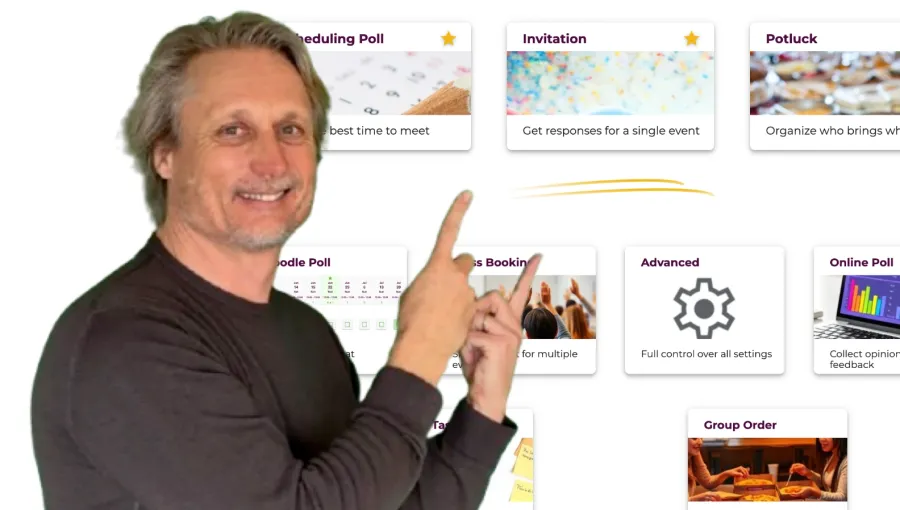
There’s that moment when you realize: the tool you need simply doesn’t exist. For me, it happened twice.
School BBQ at Küsnacht Goldbach. As vice president of the parent council at Schule Küsnacht Goldbach, I organized a barbecue every year. The teachers were invited, and the parents were supposed to bring drinks, desserts, and things to grill. What I needed: a tool that combines a nice invitation with a potluck list. I searched everywhere – and found nothing.
My 40th birthday. I wanted to throw a big party at Piccolo Giardino in Zürich. I was looking for a free online invitation tool – something to create a digital birthday invitation where people could RSVP online and I could keep track of who’s coming. Again: no suitable tool. In the end, I built my own website for it.
It was exactly this frustration that sparked the idea for Whocan – together with my co-founder Paul. And from that idea, the Poll Templates were born: 9 ready-made templates that cover exactly the situations I had been desperately looking for a tool to handle.
What are Poll Templates – and what makes them special?
Poll Templates are pre-configured survey templates on Whocan. Each template is tailored to a specific use case – from scheduling to invitations to task assignment.
What makes them special: under the hood, all templates are built on the same technology. You can switch any template to “Advanced” mode at any time and customize all settings yourself. But in most cases, you won’t need to – because the template has already configured everything correctly.
What this means for you: You pick a template, enter a title, and you’re ready to go. No clicking through 15 settings, no reading documentation, no watching tutorials.
Why no other tool does it this way
I know the competition – we’ve tested them all extensively (here’s our Doodle review). The problem is almost always the same:
- Doodle can essentially only do scheduling polls. No invitations, no potluck sign up sheets, no task assignment. And if you’re comparing doodle or when to meet – neither offers the full range.
- Google Forms is a generic form builder. Extremely flexible, but you have to build everything yourself. No event focus, no beautiful designs, no ready-made sign up sheet templates. More on this in our Google Forms vs. Whocan comparison.
- Calendly is a booking tool for 1:1 appointments. Looking for a Calendly alternative that allows multiple bookings? Calendly isn’t designed for group planning or events – but Whocan is.
- When2Meet (whentomeet) shows an availability matrix. It’s a simple meeting scheduler, but nothing more – no invitations, no sign up sheets, no polls.
None of these tools offer specialized templates for different life situations. Whether you need a free poll maker, a meeting scheduling tool, an online potluck sign up, or free online invitations – with Whocan, you pick your scenario and the tool adapts to you. Not the other way around. And all of this is free, without registration, and without ads.
All 9 Poll Templates at a Glance
Here’s a detailed look at each template – with the features that make it stand out.
1. Scheduling Poll – Find the best time to meet
 Probably our most-used template – and one of the best free meeting scheduling tools out there. Whether it’s a team meeting, a barbecue, or a parent-teacher evening – you suggest several dates and participants say when they’re available. Think of it as a modern meeting scheduler that just works.
What makes the Scheduling Poll special:
Probably our most-used template – and one of the best free meeting scheduling tools out there. Whether it’s a team meeting, a barbecue, or a parent-teacher evening – you suggest several dates and participants say when they’re available. Think of it as a modern meeting scheduler that just works.
What makes the Scheduling Poll special:
- Check everyone’s availability
- Support for recurring time slots
- Easy-to-use response dashboard Unlike Doodle or When2Meet (whentomeet), the scheduling poll on Whocan is free, requires no registration, and has no ads. And if you need more than just scheduling – like a potluck sign up or task assignment – you simply switch to a different template. More about the Scheduling Poll
2. Invitation – Free online invitations with RSVP
 This is exactly the template I wished I’d had for my 40th birthday. You create a beautiful digital birthday invitation (or any event invitation), share the link – and your guests RSVP online. You can see right away who’s coming, who’s declining, and who still needs time to decide.
In case you’re wondering: RSVP stands for “Répondez s’il vous plaît” – French for “please respond.” On an invitation, RSVP simply means you’re asking guests to confirm whether they’ll attend. With Whocan, this happens automatically when someone fills out your invitation.
What makes the Invitation special:
- Beautiful designs for digital birthday invitations and more
- Register multiple guests (e.g. “Max + partner”)
- Catering preferences (vegetarian, vegan)
- Manage guest lists easily
Looking for invitations online free? No Evite, no Punchbowl, no app you need to download first. Just share the link – done. More about free Online Invitations
3. Potluck – Online potluck sign up made easy
 This template would have saved me so much work at the school BBQ. Whether you’re organizing a community potluck at church, a neighborhood luncheon, or a casual dinner with friends – you list what’s needed and participants sign up for what they’ll bring.
Need a potluck sign up sheet template? This is it. List your categories – salads, drinks, desserts, things to grill – and people claim what they’ll contribute. Works great for everything from a salad bar buffet luncheon to a simple backyard BBQ.
What makes the Potluck special:
- List items you need
- Participants can add their own items
- Quantities supported
The beauty of it: you avoid five people bringing potato salad while nobody remembers the drinks. More about online Potluck Sign-up Sheets
4. Class Booking – Sign up sheets for multiple events
 You’re offering multiple events and want people to sign up? That’s exactly what this signup sheet template is for. Perfect for clubs, yoga classes, workshops, or school projects. And unlike Calendly, this is a Calendly alternative that allows multiple bookings – participants can register for several events at once.
What makes Class Booking special:
- Offer multiple events to choose from
- Limit participants per event
- Register multiple people at once
- Manage participants and sign up sheets
Whether you call it a sign up sheet, signup sheet, or registration form – this template handles it all. More about Class Booking
5. Assign Tasks – Share a list of responsibilities
 Who’s bringing the tables? Who’s taking care of the music? Who’s cleaning up afterward? Instead of endless WhatsApp messages, you create a task list and people sign up.
What makes the Task template special:
Who’s bringing the tables? Who’s taking care of the music? Who’s cleaning up afterward? Instead of endless WhatsApp messages, you create a task list and people sign up.
What makes the Task template special:
- Set deadlines for each task
- Participants can add their own tasks
- Clear overview of who’s handling what I use this one regularly myself whenever something needs organizing. Less chaos, more clarity. More about Task Assignment
6. Online Poll – A free poll maker for opinions and feedback
 Sometimes you don’t need scheduling – you just need answers. “Which restaurant should we book?”, “Which logo do you like better?”, “How did you enjoy the workshop?”
What makes the Online Poll special:
Sometimes you don’t need scheduling – you just need answers. “Which restaurant should we book?”, “Which logo do you like better?”, “How did you enjoy the workshop?”
What makes the Online Poll special:
- Surveys and questionnaires
- Multiple question types: checkboxes, radio buttons, dropdowns, sliders
- Free text fields for open feedback
- Response dashboard
This is our free polls maker – an alternative to Google Forms, just without a Google account, without tracking, and without 42 features you’ll never use. More about the free Online Poll Maker
7. Group Order – Collect everyone’s food order
 Friday lunch, the team wants to order pizza. Instead of an endless message thread, you create a group order – everyone enters what they want, and you have the full overview.
What makes the Group Order special:
Friday lunch, the team wants to order pizza. Instead of an endless message thread, you create a group order – everyone enters what they want, and you have the full overview.
What makes the Group Order special:
- Participants specify their orders
- Overview of all orders at a glance
- Quantities supported Sounds simple? It is. And that’s exactly the point.
8. Doodle Poll – Poll in table format
 Choosing between Doodle or When2Meet for your next scheduling poll? This template gives you the classic Doodle format: a matrix with rows and columns where everyone marks their preferences. Works not only for dates but also with text options.
What makes the Doodle Poll special:
Choosing between Doodle or When2Meet for your next scheduling poll? This template gives you the classic Doodle format: a matrix with rows and columns where everyone marks their preferences. Works not only for dates but also with text options.
What makes the Doodle Poll special:
- Clear display as a matrix
- Unlimited number of dates
- Text options available The difference to Doodle? No ads, no registration, no limitations. It’s one of the best Calendly alternatives for group scheduling. Check out our detailed Doodle comparison.
9. Advanced – Full control over all settings
 The Advanced template is for those who want full control. Here you can configure every setting yourself – from question types to layout to participant limits.
What makes the Advanced template special:
The Advanced template is for those who want full control. Here you can configure every setting yourself – from question types to layout to participant limits.
What makes the Advanced template special:
- Dates and text options freely combinable
- Checkboxes, radio buttons, dropdown – all question types available
- Registration with participant limit
- List or table format Fun fact: all other templates are essentially pre-configured versions of this one template. So if you ever hit the limits of a template, you can switch to Advanced mode at any time and customize everything.
Try it yourself
Whether you need a scheduling poll, a free online invitation, a potluck sign up sheet, sign up sheets for events, or a free poll maker – all 9 templates are free, require no registration, and have no ads. Pick the right template and create your first poll – it takes less than a minute.
Choose a Poll Template and get started
And if you have feedback or feel a template is missing – feel free to reach out. Whocan thrives on real people using it and telling us what they need. That’s exactly how these 9 templates came to be.